Smart Video IP Phones: The 2026 Guide to Hybrid Office Communication
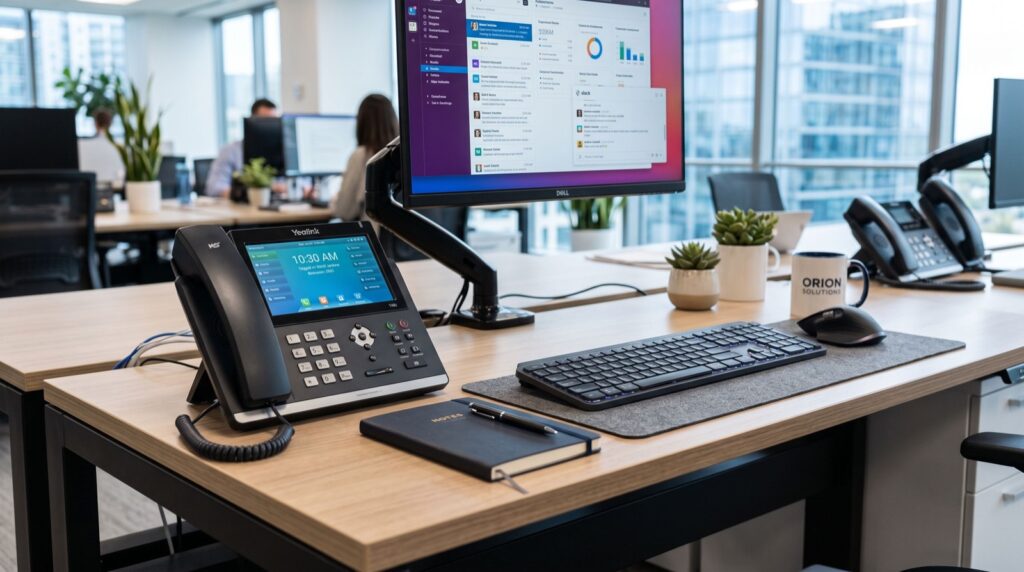
Smart video IP phones have become the anchor of the modern hybrid workplace. In 2026, teams split their week between home desks and shared offices, and the humble desk phone has quietly evolved into a full communication hub. A smart video IP phone now handles voice, HD video calls, calendar reminders, and even Android apps from one screen. If you are planning a communication upgrade this year, understanding what these devices do will save you money and frustration.
This guide walks through how smart video IP phones work, what to look for, and which models fit different office roles. We will keep the language plain and the advice practical, drawn from real deployment experience with SIP endpoints.
What Makes a Smart Video IP Phone Different
A traditional IP phone converts your voice into data packets and sends them over the internet using the SIP protocol. A smart video IP phone does all of that, then adds a large touchscreen, a camera, and an operating system. The result feels closer to a tablet than a telephone.
Because these devices run on open standards, they connect to almost any modern PBX or cloud phone platform. That flexibility matters. You are not locked into one vendor, and you can mix desk phones, cordless handsets, and softphones on the same system.
Core capabilities to expect in 2026
- HD video calling with a built-in or attachable camera for face-to-face meetings.
- Large capacitive touchscreens that replace stacks of physical buttons.
- Android-based apps so staff can open collaboration tools directly on the phone.
- Gigabit ports and PoE for a single-cable install with no separate power brick.
- Wideband and super-wideband audio for clearer, more natural speech.
These features turn a phone into a personal meeting station. Executives and front-desk staff especially benefit, because they field video and voice calls all day.
Choosing the Right Smart Video IP Phone for Each Role
Not every desk needs the top model. Matching the device to the job keeps your budget sensible. A flagship touchscreen unit suits managers and reception, while a high-density model fits busy operators who juggle many lines at once.
For a premium executive station, the Fanvil V67 Flagship Smart Video Phone pairs a bright touchscreen with strong video performance, making it ideal for leadership desks and meeting-heavy roles. For power users who manage dozens of simultaneous calls, the Fanvil X210 offers a color display with expansion capacity that reception teams love.
Quick role-to-device match
| Office Role | Recommended Phone Type | Why It Fits |
|---|---|---|
| Executive / Manager | Flagship smart video phone | HD video, large screen, apps |
| Reception / Operator | High-density line phone | Many BLF keys, expansion module |
| General staff desk | Mid-range color IP phone | Reliable voice, low cost |
| Mobile / roaming staff | Cordless or Wi-Fi handset | Freedom to move around |
How Smart Video Phones Support Unified Communications
Unified communications, or UC, means voice, video, messaging, and presence all working together. A smart video IP phone is a physical gateway into that ecosystem. When a colleague marks themselves busy in the software, your phone shows it. When a meeting starts, the phone rings with a video invite.
This tight integration reduces missed calls and wasted time. Staff no longer bounce between a headset, a laptop, and a mobile. One device covers most communication needs at the desk.
The Session Initiation Protocol, or SIP, is the open standard that makes this possible. It is maintained through the IETF, and you can read the foundational specification in RFC 3261. Because SIP is open, your smart phones interoperate across brands and platforms.
Deployment tip from the field
Before rolling out video phones company-wide, run a small pilot with three or four users. Check your network handles the extra video bandwidth. A single HD video call can use up to 2 Mbps in each direction, so multiply that across a busy floor. Prioritize voice and video traffic using QoS settings on your switches, and you will avoid choppy calls later.
Network and Power Considerations
Smart video phones draw more power than basic handsets. Most support Power over Ethernet, which delivers data and electricity through one cable. Confirm your switch supports at least PoE (802.3af) and preferably PoE+ (802.3at) for the larger screens.
- Audit your switch PoE budget before buying dozens of units.
- Use Cat6 cabling for gigabit speeds and future headroom.
- Enable VLAN separation to keep voice traffic clean.
- Set up automatic provisioning so new phones configure themselves.
Working with an experienced local team during setup pays off. Provisioning, firmware, and network tuning are where most deployments stumble, and a good integrator handles those in an afternoon.
Cost, Lifespan, and Return on Investment
A smart video IP phone costs more upfront than a basic handset, but the value shows over time. These devices last five years or more with firmware updates keeping them current. Spread across that lifespan, the monthly cost is small compared with the productivity gained from instant video meetings at every key desk.
Think about the hidden savings too. Fewer separate webcams, fewer standalone conference units, and less time lost fumbling with laptops before a call. When reception and management can start a video conversation in two taps, the whole office feels more responsive to clients.
What drives long-term value
- Firmware support keeps security tight and features fresh for years.
- Standard SIP compatibility means no forced hardware swaps if you change providers.
- Central provisioning cuts IT time when you update many phones at once.
- Reduced device sprawl since one unit handles voice and video.
According to industry analysts tracking unified communications, hybrid work has permanently raised demand for desk-based video endpoints through 2026 and beyond. Investing in quality now avoids a rushed, costly upgrade later when your team scales.
Frequently Asked Questions
What is a smart video IP phone?
It is a desk phone that uses the SIP protocol for voice and adds a touchscreen, camera, and an operating system for HD video calls and apps. It combines a telephone and a small video meeting station in one device.
Do smart video IP phones work with any phone system?
Almost always, yes. Because they use open SIP standards, they connect to most cloud phone services and on-premise PBX platforms. Always confirm compatibility with your provider before a large order.
How much bandwidth does a video IP phone need?
Plan for around 1 to 2 Mbps per direction for a single HD video call. Add QoS rules on your network so video and voice always get priority over general data traffic.
Are smart video phones worth it for small offices?
Yes, for the right roles. Reception and management gain the most. General staff desks can stay on cheaper color IP phones while a few key seats get the premium video units.
Conclusion
In 2026, the smart video IP phone is no longer a luxury item. It is a practical tool that keeps hybrid teams connected with clear voice and face-to-face video from a single, reliable device. Match the phone to the role, plan your network, and pilot before you scale. Do that, and your communication upgrade will feel effortless. Choose quality SIP endpoints from a trusted supplier, and your smart video phones will serve your office for years.